

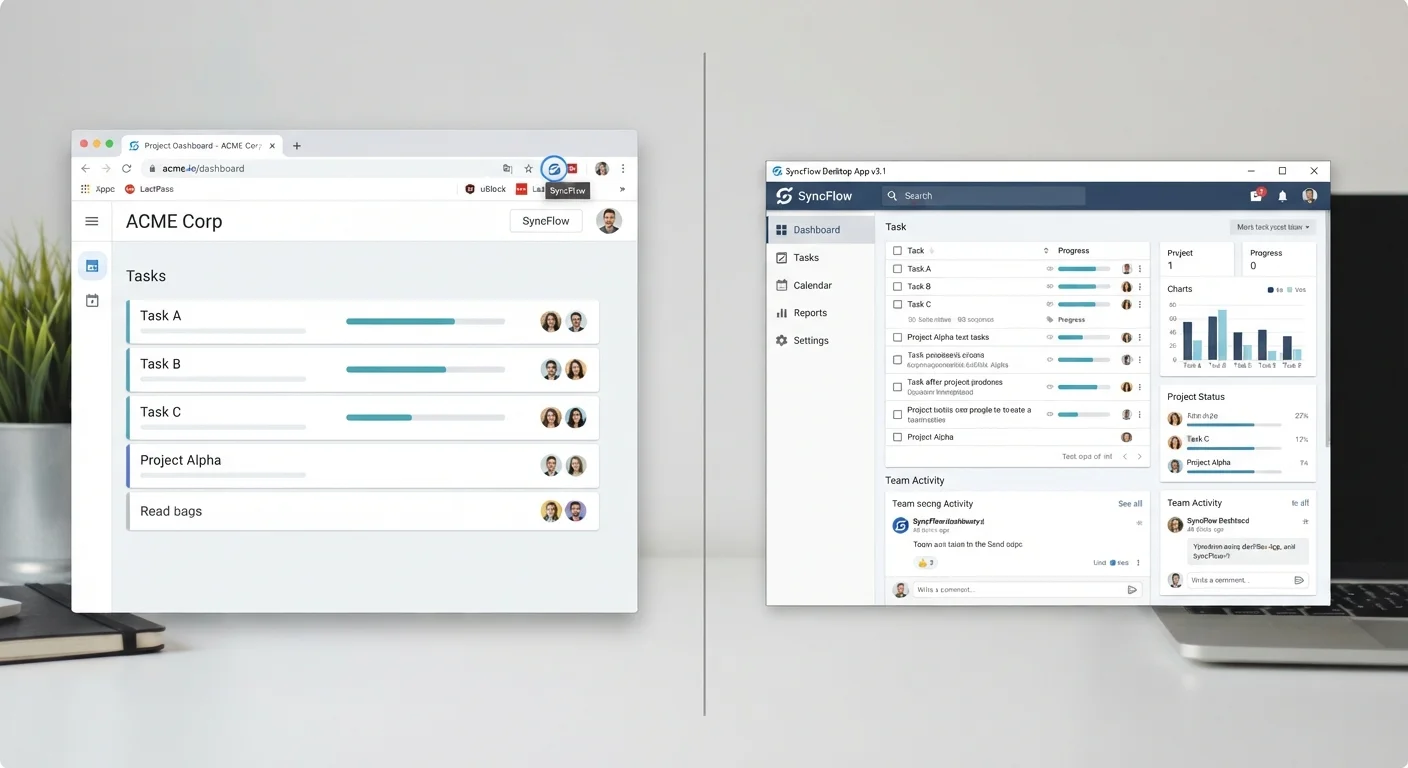
Option A
Browser Extensions
The lightweight, in-browser layer that works where you already are.
Best for: Quick, context-sensitive tasks you want to accomplish without leaving your browser.
Option B
Standalone Apps
The full-featured, dedicated tool installed directly on your device.
Best for: Complex, resource-intensive workflows that benefit from deeper system access and offline capability.
What Each Format Actually Is
A browser extension (sometimes called a plug-in or add-on) is a small piece of software that installs inside a web browser — Chrome, Firefox, Safari, Edge — and adds functionality to it. It lives in the browser's toolbar or runs silently in the background while you're online. Examples include ad blockers, grammar checkers, and password managers that auto-fill login forms.
A standalone app, by contrast, is a full application installed directly on your operating system — Windows, macOS, iOS, or Android. It runs in its own window, independent of any browser. Examples include dedicated note-taking software, video editors, or a desktop version of a password manager.
Some tools offer both formats, letting you choose. Others only exist in one. Understanding the structural difference between the two helps you evaluate which one will actually serve you day to day.
| Criterion | Browser Extensions | Standalone Apps |
|---|---|---|
| Where it runs | Inside a specific browser | Directly on the operating system |
| Installation effort | One click, no system changes | Full install, may require permissions |
| Offline capability | Generally none | Often available |
| System resource access | Limited to browser sandbox | Broader OS-level access |
| Cross-device portability | Via browser sync account | Requires separate install per device |
| Permission transparency | Variable; often broad | Typically more granular at install |
| Long-term stability | Can break with browser updates | More predictable release cycle |
Where Extensions Have the Edge
Extensions shine when the task is closely tied to what's already happening in your browser. If you want a tool that checks spelling as you type into web forms, highlights prices while you browse, or mutes tabs automatically, an extension is frictionless — it's already there when you need it.
They're also easier to try. Installing a browser extension is typically a one-click process with no system-level changes, and removing it is equally simple. This low-commitment install cycle makes them practical for testing whether a tool is actually useful before committing to anything heavier.
For users who work across multiple machines but share the same browser account, extensions that sync via the browser's cloud account can follow you from device to device automatically.
~180,000
Extensions available in the Chrome Web Store
The Chrome Web Store lists roughly 180,000 extensions, reflecting how common browser-based tooling has become for everyday users.
~79%
US adults who use a smartphone app regularly
According to Pew Research Center data, the large majority of US adults use smartphone apps as part of their daily digital routines.
Where Standalone Apps Pull Ahead
Standalone apps have access to system resources that browsers simply don't expose to extensions. That means they can handle large files, run complex processes in the background, and work even when you're not connected to the internet. If you've ever used offline features in an app, that capability almost always comes from a standalone installation, not a browser extension.
Standalone apps also tend to be more stable over time. Browser updates can break extensions without warning, and extension developers sometimes abandon their tools. A well-maintained standalone application typically has a more predictable release cycle and support structure.
For anything that handles sensitive data — financial records, health documents, encrypted communications — a standalone app's more defined permission model is generally easier to reason about. You can review what access an app requests during installation rather than granting broad browser-level access. See our guide to app permissions for a closer look at what those requests actually mean.
The Privacy Question You Should Ask First
Browser extensions operate inside your browser, which means a poorly designed — or deliberately malicious — extension can theoretically read everything you do there: the pages you visit, the text you type, form data, and more. This isn't hypothetical; researchers have documented cases where extensions were sold to third parties after initial publication, with the new owners changing their data practices.
Before installing any extension, check what permissions it requests. An extension that blocks ads doesn't need access to your clipboard or the ability to read data on all websites. Treat extension permissions with the same scrutiny you'd apply to a new app. Our internet privacy audit checklist walks through how to review your installed extensions as part of a broader privacy review.
Standalone apps aren't immune to privacy risks, but their permission requests are typically more granular and are reviewed during installation by the operating system rather than silently at runtime. For a broader pre-install checklist, see things worth checking before installing any new app.
Extensions Can Be Updated Silently
Unlike standalone apps, browser extensions can update automatically in the background without notifying you. This means an extension you installed and trusted last year may have different permissions or behavior today. It's worth periodically reviewing your installed extensions — especially any you rarely use — to confirm they still behave as expected and haven't changed ownership.
Making the Call: A Practical Framework
Ask yourself three questions before choosing a format:
- Is this task browser-based? If the tool only needs to work while you're using a website, an extension is probably sufficient.
- Do I need it offline or at a system level? If yes, a standalone app is the better fit.
- How sensitive is the data involved? Higher sensitivity warrants a closer look at permissions — and sometimes the more transparent standalone model.
If you're already managing too many tools across both formats, organising your digital life offers practical steps for auditing and simplifying your setup. The goal isn't to pick one format universally — it's to match the format to the job.
The content on this site is for informational purposes only and is not a substitute for professional advice. Always consult a qualified professional for guidance specific to your situation.